
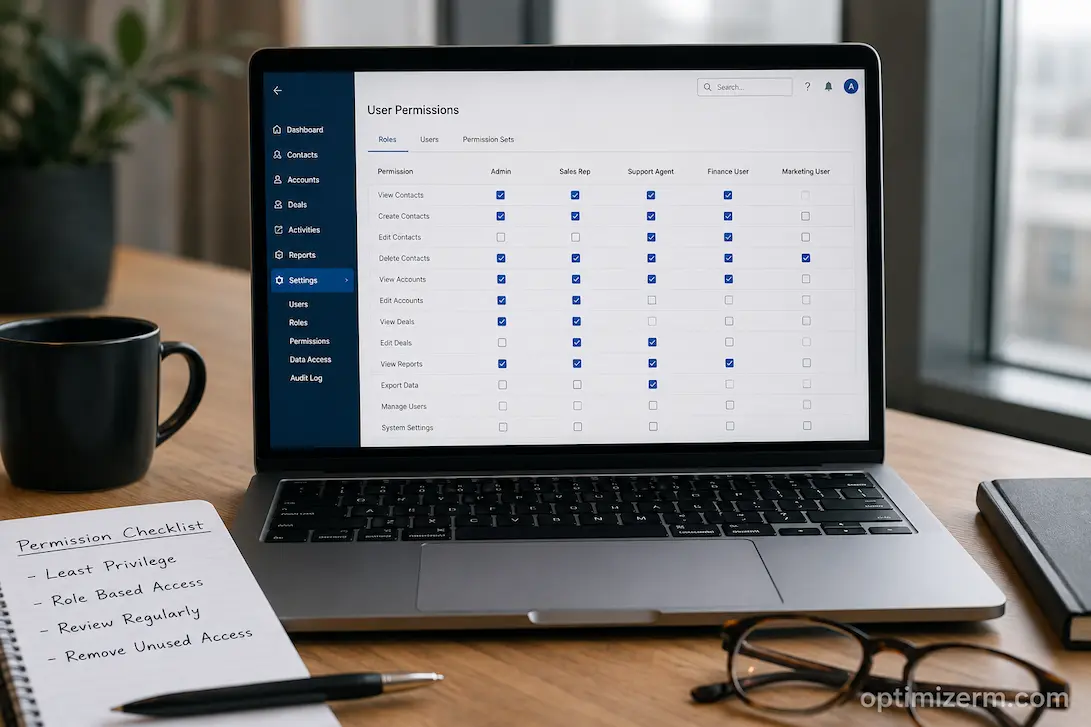
CRM systems can hold a wealth of customer data. However, unrestricted access to this information quickly introduces new risks. Sales staff may only need to view the customer data assigned to them, whereas the finance team might only need to see invoicing details rather than marketing campaign specifics. Customer service representatives often require full interaction logs but lack the authority to modify pricing or contract details. Granting everyone the same access rights leads either to the unnecessary leakage of sensitive information or to such severe restrictions on employee capabilities that even basic tasks become cumbersome.
This means that user rights involve more than just IT configuration; they influence how customer data is handled daily. A well-designed permissions model protects personal information while enabling employees to perform their tasks without repeatedly having to request access. The key lies in finding the right level of security—one that boosts efficiency rather than creating obstacles.
Many organizations struggle with the issue of access rights accumulating over months or even years. New employees inherit the rights of existing users, temporary access is never revoked, departmental responsibilities constantly shift, and exceptions eventually become the norm. Ultimately, no one knows exactly who holds which access rights, making audits, compliance reviews, and operational adjustments far more difficult.
Companies should view permissions not merely as a set of technical settings, but as an integral part of their operational design. Every permission should be justified by whether it enables legitimate business activities or protects critical assets. If neither justification applies, the permission should be reviewed.
Before Assigning Permissions, Understand How People Actually Work
A common mistake during CRM implementations is creating user roles based solely on job titles. Two employees with the same job title may have drastically different tasks due to variations in geographic location, product line, customer base, or management responsibilities. Building a permission model based exclusively on organizational structures often leads to countless exceptions down the line.
A good starting point is observing daily routines. Ask employees what information they need to complete their work, what tasks they perform most frequently, and which records they rarely use. Such interactions often reveal that departments need access to specific aspects of the same customer data, rather than requiring blanket permissions.
For example, a salesperson might want to modify deal stages and contact details but does not need to adjust the organization’s entire pricing strategy. A customer service representative might want to view service history, warranty information, and past interactions but does not need access to private sales quotes. By focusing on actual work activities rather than department names, you can establish more realistic and less restrictive access rights.
This strategy also minimizes unnecessary complexity. Instead of creating dozens of unique access rights for every employee, companies can identify typical work patterns and design standardized roles that reflect the team’s actual operations.
Think in Terms of Business Responsibilities Instead of Departments
Departments change over time. Teams merge, new products are introduced, and employees take on additional responsibilities. Business responsibilities, however, tend to remain more stable because they describe the work itself rather than where someone sits in the organization.
Consider the difference between these two approaches:
| Department-Based Access | Responsibility-Based Access |
|---|---|
| Sales Team | Opportunity Management |
| Customer Service | Case Resolution |
| Marketing | Campaign Administration |
| Finance | Billing Oversight |
| Executive Team | Strategic Reporting |
The second model makes future changes much easier. If an employee moves between departments but continues performing the same operational tasks, their permission requirements remain largely unchanged. Likewise, if a new department is created, existing responsibility-based roles can often be reused instead of starting from scratch.
This strategy also helps maintain consistency across different business units. Employees performing identical work should generally receive the same permissions regardless of office location or reporting structure.
Not Every Employee Needs the Same Type of Access
When organizations first deploy a CRM, there is often pressure to give employees broad access “just in case they need it later.” While this may seem convenient, excessive permissions create both security and operational problems.
Instead of asking what users might need someday, focus on what they genuinely require today. Most CRM activities fall into several distinct permission categories:
- Viewing customer information
- Creating new records
- Editing existing records
- Deleting information
- Exporting customer data
- Running reports
- Managing system settings
These categories should rarely be assigned together automatically. For example, someone responsible for creating customer records does not necessarily need permission to delete them. Likewise, employees who generate operational reports may not need the ability to export entire customer databases.
Separating these activities reduces unnecessary exposure while making permission reviews much easier. During audits, managers can quickly explain why someone has a specific capability because every permission aligns with a defined business responsibility.
The Principle of Least Privilege Isn’t About Restricting People
Security professionals often recommend the principle of least privilege, but the concept is frequently misunderstood. Employees sometimes interpret it as management trying to limit their ability to work.
In reality, the principle simply means providing enough access to perform assigned responsibilities—nothing more and nothing less. The objective is not to create obstacles but to reduce unnecessary risk.
Imagine a customer service representative accidentally editing pricing information because their account inherited administrative permissions from another employee. The issue is not employee trust; it is that the system allowed an action unrelated to their responsibilities.
Similarly, if a marketing contractor can download the organization’s complete customer database even though they only need campaign audiences, the permission model creates unnecessary exposure. Restricting that capability protects both the organization and the employee from avoidable mistakes.
The UK’s National Cyber Security Centre recommends limiting user privileges to only those required for legitimate business activities as part of broader access control and cyber security practices. This reduces the potential impact of compromised accounts and accidental misuse.
Temporary Access Should Actually Be Temporary
Businesses regularly encounter situations where employees need additional permissions for a limited period. A project manager may require administrative access during CRM testing, or an auditor may need broader visibility while reviewing customer records.
Problems arise when temporary permissions remain active long after the original reason disappears.
One practical solution is to treat elevated permissions like temporary business requests instead of permanent user characteristics. Every additional permission should have:
- A documented reason
- An approving manager
- A defined expiration date
- A review before renewal
This process may seem administrative, but it prevents permission growth over time. Without periodic reviews, organizations often discover former contractors, transferred employees, or retired projects still influencing current access rights.
Several regional cybersecurity agencies, including Australia’s Australian Signals Directorate through its Essential Eight guidance, encourage organizations to regularly review privileged accounts rather than assuming access remains appropriate indefinitely.
Separate Sensitive Information From Everyday Operations
Not all customer information carries the same level of business risk. Contact names and company addresses generally require different protection than payment details, confidential contract terms, identity documents, or regulated personal information.
Instead of protecting every field equally, organizations should classify sensitive information according to business impact.
For instance, everyday operational data may be available to frontline employees because they need it to assist customers efficiently. Highly confidential financial agreements, executive notes, legal documents, or compliance records might only be accessible to specific roles with a demonstrated business need.
This layered approach improves both security and usability. Employees spend less time navigating information irrelevant to their work, while sensitive records receive stronger protection without slowing routine customer interactions.
Data classification also simplifies future expansion. As new CRM modules or integrations are introduced, security decisions can follow established classification rules instead of being made individually for every new feature.
Permissions Should Support Collaboration, Not Prevent It
Organizations occasionally overcorrect after experiencing a security concern. In an effort to reduce risk, they create permission models so restrictive that employees constantly depend on colleagues to retrieve information.
This creates a different kind of operational problem. Customer questions take longer to answer, approvals become bottlenecks, and employees begin storing information outside the CRM simply because accessing the official system feels too difficult.
A balanced permission strategy asks an important question before restricting access:
Does limiting this information meaningfully reduce business risk, or does it simply make everyday work slower?
If a restriction creates significant operational delays without offering meaningful protection, it deserves reconsideration. Security measures should address realistic risks rather than hypothetical scenarios.
Well-balanced permissions encourage employees to rely on the CRM because it remains the easiest place to find accurate customer information. Excessively restrictive systems often produce the opposite outcome, driving users back toward spreadsheets, shared documents, and informal communication channels that are much harder to secure.
Record Visibility Can Be More Important Than Feature Access
Giving someone permission to use a CRM feature does not necessarily mean they should see every record associated with that feature. This distinction becomes particularly important as organizations grow. A salesperson may need to manage opportunities, for example, but that does not automatically mean they should see every opportunity belonging to every region, division, or strategic account.
Record-level visibility can provide a more practical balance. Employees can receive the tools required for their role while the CRM determines which customer records they are allowed to view or modify. This can be useful for organizations with regional sales teams, separate business units, franchise operations, or customers handled by dedicated account teams.
However, visibility rules should reflect genuine business boundaries rather than becoming another layer of complexity. If employees constantly need access to records outside their assigned group, the organization should investigate why. The problem may indicate that the original access model does not reflect how teams actually collaborate.
A useful test is to examine common customer scenarios. If a sales representative needs information from another team to answer a customer question, can they obtain it through the CRM without bypassing security controls? If not, the permission structure may be technically secure but operationally ineffective.
Editing and Viewing Should Be Treated Differently
The ability to see information and the ability to change it represent two different levels of risk. Many CRM permission models become unnecessarily restrictive because organizations treat them as the same decision.
A customer service employee may need to view an account’s contract status to resolve an inquiry but have no legitimate reason to change the contract itself. A sales representative might need to update a customer’s contact details but should not be able to modify financial information maintained by another department.
Separating read access from modification rights allows organizations to provide useful information without giving employees unnecessary access, as only people responsible for maintaining those records can make changes to important information.
This is particularly valuable for fields that influence downstream processes. Changing a customer category, account owner, credit status, or opportunity stage may trigger automation or alter management reporting. Such fields deserve more careful permission design than ordinary descriptive information.
Be Careful With Export and Download Permissions
An employee may need to view thousands of customer records without needing the ability to download all of them. Export permissions therefore deserve separate consideration rather than being bundled automatically with ordinary reporting access.
The risk is not limited to deliberate misuse. A legitimate employee could accidentally download a large customer list to a personal computer, email it to the wrong recipient, or retain a file long after the original business purpose has disappeared. Once information leaves the controlled CRM environment, the organization may have fewer opportunities to manage how it is stored or shared.
Before granting bulk-export capabilities, ask what business activity requires them and whether a less risky alternative exists. A manager may need a specific report, for example, without requiring unrestricted access to export an entire customer database.
Where exports are necessary, organizations can strengthen the process through approval requirements, monitoring, data-loss prevention controls, and clear policies governing how exported information may be stored or shared. The exact controls depend on the CRM platform and the sensitivity of the information involved.
Build an Approval Path for Exceptions
No permission model can anticipate every legitimate business situation. Employees will occasionally need access outside their standard role, and refusing every exception can make the CRM difficult to use.
The solution is not to give everyone broad permissions in advance. Instead, create a controlled process for requesting additional access.
An employee should be able to explain what information or action they need, why the standard role is insufficient, how long the access is required, and who has approved the request. This turns exceptions into visible business decisions rather than informal arrangements between employees.
The process should also distinguish between routine and high-risk requests. A temporary request to view another team’s account may require a simple manager approval, while access to sensitive financial or personal information may require additional authorization.
Over time, exception requests can reveal weaknesses in the underlying permission model. If the same access request appears repeatedly, the organization may need to create a legitimate role or modify an existing one rather than processing the same exception indefinitely.
Review Permissions When People’s Jobs Change
Employee onboarding receives considerable attention, but offboarding and internal transfers can create equally important access problems. Someone who moves from sales into operations may no longer require access to sensitive sales information, even though their account remains active.
Therefore, connect permission reviews to changes in employment status and responsibilities. New employees should receive access appropriate to their role, transferred employees should have obsolete permissions removed, and departing employees should have access revoked promptly according to the organization’s security procedures.
This becomes particularly important in organizations where employees temporarily support other departments. Access added during a project can easily remain active afterward unless someone is responsible for removing it.
A practical approach is to make permission ownership explicit. Managers should understand that approving access also creates a responsibility to ensure that access remains appropriate. IT or CRM administrators can manage the technical implementation, but business owners should remain accountable for the underlying decision.
Avoid Building a Permission System Nobody Can Explain
Complexity itself can become a security problem. An organization may have dozens of roles, custom permission sets, exceptions, and manually assigned privileges, yet still be unable to explain why a particular employee has access to a sensitive record.
A permission model should be understandable enough that a new administrator can review it without relying on institutional memory. Document the purpose of each major role, the responsibilities it supports, the sensitive information it can access, and the circumstances under which additional permissions may be granted.
This documentation also makes audits much easier. Instead of examining every user individually, administrators can first review the underlying role structure and then investigate exceptions.
If the permission model has become too complicated, resist the temptation to solve the problem by creating another role. First determine whether existing roles can be consolidated. Fewer well-designed roles are generally easier to maintain than a large collection of highly specific combinations.
Test Permissions From the Employee’s Perspective
A permission configuration can look correct from an administrator’s screen and still create problems for employees. Testing should therefore involve representative users performing realistic tasks.
Ask a sales representative to create and update an opportunity. Have a support employee resolve a customer issue using the information available to them. Ask a manager to review a report, ensuring they do not have unnecessary administrative capabilities. Then deliberately test actions they should avoid.
This second part is particularly important. Permission testing should confirm both sides of the model: authorized actions work, and unauthorized actions are properly blocked.
Testing should also consider unusual but realistic situations. What happens when an employee needs to collaborate with another team? Can they request access without creating an informal workaround? What happens when a customer is reassigned? Does record visibility update appropriately?
These scenarios expose weaknesses that a simple checklist may miss.
Review Access After the CRM Changes
Permissions should not be considered finished after the initial CRM implementation. New modules, integrations, automation, reporting features, and organizational changes can all affect access requirements.
A quarterly or otherwise risk-appropriate access review can examine privileged users, inactive accounts, exceptions, external users, export capabilities, and access to particularly sensitive information. Higher-risk permissions may warrant more frequent review than ordinary operational access.
The purpose is not to force managers through an administrative exercise. The review should answer a practical question: If this person’s responsibilities changed today, would they still have the right level of CRM access?
If the answer is no, the permission structure has already become outdated.
A Simple Framework for Deciding Access
When designing or reviewing a permission, organizations can use a five-question test:
- What task requires this access?
- Which records or information are actually needed?
- Does the employee need to view, create, edit, delete, or export it?
- How long should the access remain active?
- Who is responsible for reviewing it later?
This framework prevents permission decisions from becoming purely technical. It connects every access decision to a business activity, a defined scope, and an accountable owner.
The answers can also expose unnecessary privileges. If nobody can identify a specific task requiring a permission, it may not belong in the employee’s role. Conversely, if employees repeatedly request the same capability, the organization may have identified a legitimate requirement that should be incorporated into the standard design.
Common Permission Mistakes to Watch For
Copying access from another employee. This is convenient during onboarding but can transfer permissions that have nothing to do with the new employee’s responsibilities.
Making managers administrators by default. Management responsibility does not automatically require technical control over the CRM.
Giving permanent access for temporary projects. Temporary permissions should have an explicit end point and review process.
Ignoring export capabilities. Viewing customer information and downloading the entire database present very different risks.
Creating too many exceptions. Repeated exceptions usually indicate that the standard permission model needs improvement.
Failing to review transferred employees. A change in responsibilities should trigger a review of access rather than leaving the previous role untouched.
Making security so restrictive that employees work around it. When legitimate work becomes unnecessarily difficult, employees may create spreadsheets, shared files, or informal processes that introduce new risks.
Security Works Better When It Fits the Work
The most restrictive CRM permission policy is not necessarily the most robust. A truly effective strategy clearly defines the relationship between responsibilities, access permissions, and risks, so employees can work efficiently without receiving unnecessary permissions.
This involves more than just defining roles during implementation. Companies must understand their actual business processes, separate read and edit rights, restrict access to key fields and outputs, manage temporary access rights, review permissions when responsibilities change, and provide reasonable procedures for handling legitimate exceptions.
Above all, the access control design must closely align with the company’s operations. CRM systems are designed to make customer data more valuable to those who serve customers, manage customer relationships, and make decisions. Security measures must protect this information without permitting indiscriminate access. This is an ongoing challenge.
When permissions are established based on actual responsibilities and reviewed as those responsibilities evolve, security becomes an integral part of the CRM system’s operational model rather than an afterthought. Such a system is easier to manage, easier to audit, and—equally important—easier for employees to use correctly.
Frequently Asked Questions
What is the best starting point for CRM permissions?
Focus on business processes first, not the CRM configuration. What do employees actually need to do? What information is useful for these activities? Then, map these needs to the appropriate roles and permissions.
Should all employees be able to view customer data?
Not necessarily. Access rights should be based on actual job duties and the sensitivity of the information. Generally, employees should have sufficient visibility to perform their work, rather than unrestricted access simply for the sake of convenience.
Are administrators always the riskiest users?
Regular users can also pose significant risks through data exports, accidental sharing, or leaking login credentials. Administrators typically possess higher technical skills, making the security of their accounts particularly critical. Security measures must address both privileged and standard access.
How often should CRM permissions be reviewed?
There is no one-size-fits-all review frequency for every organization. Reviews should be risk-based, with additional checks performed when employees’ responsibilities change, when they leave the company, or when they are granted higher access levels. Generally, elevated permissions require stricter oversight than standard access rights.
What should happen if employees need access to resources outside their normal scope of work?
Use a documented process for handling exceptions. Employees must provide a valid business justification, obtain the necessary approvals, and—where possible—set a clear expiration date for temporary access rights. If multiple exceptions occur, their standard role should be re-evaluated.
Can too many permissions hurt CRM adoption?
Yes. Excessive permissions can lead to the leakage of critical information, while overly restrictive settings can result in a poor CRM user experience. When employees cannot perform legitimate tasks efficiently, they may resort to unauthorized workarounds, thereby compromising data quality and security.